I’ll never forget the time an application bug nearly wiped out a critical production table. A simple DELETE statement without a WHERE clause could have been catastrophic. That incident taught me a valuable lesson: application service accounts should never have the power to delete data. This led me to develop a two-user security model in PostgreSQL that I now use for all my projects to prevent these kinds of accidents.
My Two-User Security Model
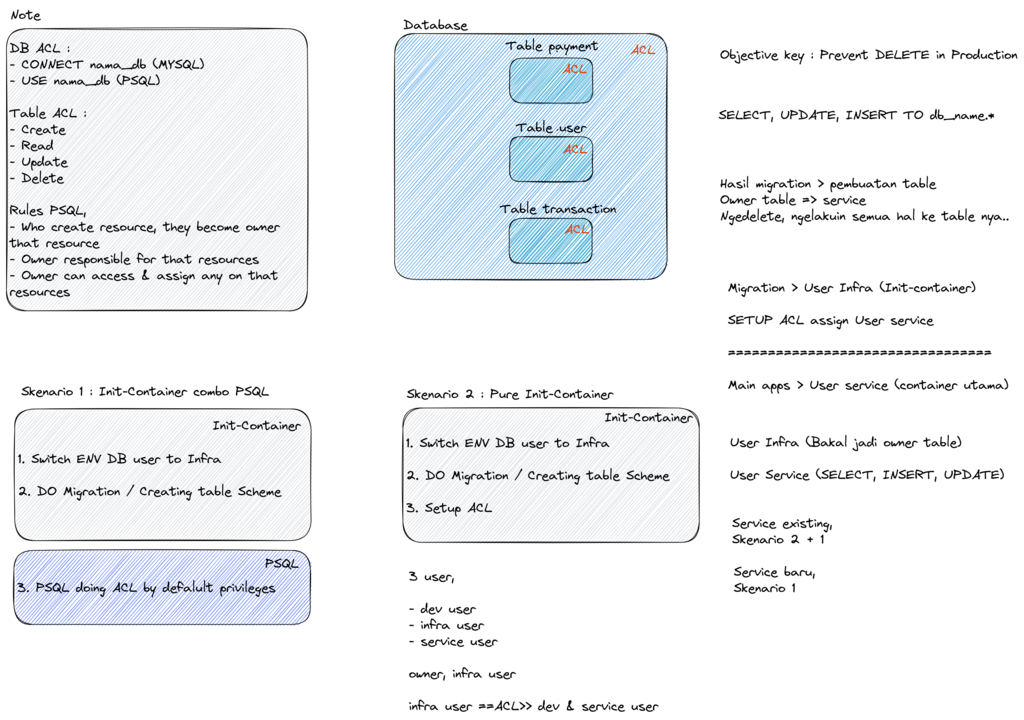
My approach is simple but effective. I create two distinct user roles for every application, each with a different level of privilege. This model is visualized below, showing how the admin user has full control while the service user has restricted permissions.
graph TB
    subgraph Admin Flow
        AdminUser[admin-apps<br/>Database Owner]
        Migration[Database Migration<br/>Schema Changes]
        Grant[Grant ACL to service-apps]
    end

    subgraph Service Flow
        ServiceUser[service-apps<br/>Application User]
        CRUD[Application Operations]
        Create[✓ INSERT]
        Read[✓ SELECT]
        Update[✓ UPDATE]
        Delete[✗ DELETE<br/>DENIED]
    end

    subgraph Database
        Tables[(Database Tables)]
    end

    AdminUser --> Migration
    Migration --> Tables
    Migration --> Grant
    Grant --> ServiceUser

    ServiceUser --> CRUD
    CRUD --> Create
    CRUD --> Read
    CRUD --> Update
    CRUD --> Delete

    Tables -.-> ServiceUser

    style AdminUser fill:#ff9800,color:#fff
    style ServiceUser fill:#2196f3,color:#fff
    style Delete fill:#f44336,color:#fff
    style Tables fill:#4caf50,color:#fff
The first user, which I call admin-apps, is the database owner. This account is responsible for creating tables, running schema migrations, and granting permissions to other users. It has full control over the database structure.
The second user, service-apps, is the one the application uses at runtime. I strictly limit its permissions: it can SELECT, INSERT, and UPDATE data, but it is explicitly denied the ability to DELETE records. This is the core of the safety mechanism.
To implement this, my favorite method is the initContainer pattern in Kubernetes, which runs the database migrations and sets up the ACLs before the main application container starts. Alternatively, running migrations as a separate Kubernetes Job also works well.
Here’s how I set it up.
Step 1: Create the Database Users
First, I create the two users in PostgreSQL and set up the database itself, making sure the admin_apps user is the owner.
-- Create admin user (owner)
CREATE USER admin_apps WITH PASSWORD 'secure_admin_password';

-- Create service user (application)
CREATE USER service_apps WITH PASSWORD 'secure_service_password';

-- Create database owned by admin
CREATE DATABASE myapp OWNER admin_apps;
Step 2: Configure Application Secrets
Next, in Kubernetes, I create two separate secrets. It’s crucial to keep these credentials isolated: one for the migration process and one for the running application.
# admin-db-secret.yaml (for migrations)
apiVersion: v1
kind: Secret
metadata:
  name: admin-db-secret
  namespace: production
type: Opaque
stringData:
  DB_HOST: postgres.example.com
  DB_PORT: "5432"
  DB_NAME: myapp
  DB_USER: admin_apps
  DB_PASSWORD: secure_admin_password
  DB_SSLMODE: require

---
# service-db-secret.yaml (for application)
apiVersion: v1
kind: Secret
metadata:
  name: service-db-secret
  namespace: production
type: Opaque
stringData:
  DB_HOST: postgres.example.com
  DB_PORT: "5432"
  DB_NAME: myapp
  DB_USER: service_apps
  DB_PASSWORD: secure_service_password
  DB_SSLMODE: require
Step 3: Implement the Init Container
The core of this pattern is the initContainer in my application’s deployment. This container runs to completion before the main app container starts. It uses the admin credentials to perform database migrations. Once the migrations are done, it runs a few psql commands to grant the necessary SELECT, INSERT, and UPDATE permissions to the service_apps user. Notice that DELETE is intentionally left out.
# deployment.yaml
apiVersion: apps/v1
kind: Deployment
metadata:
  name: myapp
  namespace: production
spec:
  replicas: 2
  selector:
    matchLabels:
      app: myapp
  template:
    metadata:
      labels:
        app: myapp
    spec:
      # This init container runs first
      initContainers:
      - name: db-migration
        image: myapp:latest
        command:
        - /bin/sh
        - -c
        - |
          set -e
          echo "Installing PostgreSQL client..."
          apk add --no-cache postgresql-client

          echo "Running database migrations as admin..."
          # Use admin credentials for migration
          export DB_USER=${ADMIN_DB_USER}
          export DB_PASSWORD=${ADMIN_DB_PASSWORD}

          # Run your migration command (e.g., flyway, alembic)
          ./migrate up

          echo "Setting up ACL for service user..."
          export PGPASSWORD=${ADMIN_DB_PASSWORD}

          # Grant permissions but exclude DELETE
          psql -h ${DB_HOST} -U ${ADMIN_DB_USER} -d ${DB_NAME} -c "GRANT SELECT, INSERT, UPDATE ON ALL TABLES IN SCHEMA public TO service_apps;"
          psql -h ${DB_HOST} -U ${ADMIN_DB_USER} -d ${DB_NAME} -c "GRANT USAGE, SELECT ON ALL SEQUENCES IN SCHEMA public TO service_apps;"

          # Set default privileges for any new tables created in the future
          psql -h ${DB_HOST} -U ${ADMIN_DB_USER} -d ${DB_NAME} -c "ALTER DEFAULT PRIVILEGES IN SCHEMA public GRANT SELECT, INSERT, UPDATE ON TABLES TO service_apps;"
          psql -h ${DB_HOST} -U ${ADMIN_DB_USER} -d ${DB_NAME} -c "ALTER DEFAULT PRIVILEGES IN SCHEMA public GRANT USAGE, SELECT ON SEQUENCES TO service_apps;"

          echo "ACL setup completed successfully!"

        env:
        # Admin credentials from the first secret
        - name: ADMIN_DB_USER
          valueFrom:
            secretKeyRef:
              name: admin-db-secret
              key: DB_USER
        # ... other admin env vars

      # The main application container uses the limited service credentials
      containers:
      - name: app
        image: myapp:latest
        ports:
        - containerPort: 8080
        env:
        # Service credentials from the second secret
        - name: DB_USER
          valueFrom:
            secretKeyRef:
              name: service-db-secret
              key: DB_USER
        # ... other service env vars
Step 4: Test the Permissions
The final step is to test it. I always connect as the service_apps user and try to run a DELETE command. Seeing that ERROR: permission denied is a great feeling, as it confirms the protection is working.
-- Connect as service_apps
\c myapp service_apps

-- These should work:
SELECT * FROM users;                    -- ✓ Works
INSERT INTO users (name) VALUES ('test'); -- ✓ Works
UPDATE users SET name = 'updated' WHERE id = 1; -- ✓ Works

-- This should fail:
DELETE FROM users WHERE id = 1;          -- ✗ ERROR: permission denied for table users
Advanced ACL Patterns
Beyond this basic setup, I’ve used more advanced ACL patterns for even tighter security. For example, you can grant permissions only on specific tables, or even at the column level to hide sensitive data like a password_hash. I also create dedicated read-only users for analytics teams and have a documented process for temporarily granting DELETE permissions for specific, controlled data cleanup tasks, revoking the privilege immediately after.
How I Keep an Eye on Things
To make sure everything is working as expected, I enable audit logging in PostgreSQL (log_statement = 'mod'). This lets me see all data modification statements. If I run into issues, like the application not being able to read from a new table, it’s usually because I forgot to grant USAGE on the schema or set the ALTER DEFAULT PRIVILEGES for future tables.
Final Thoughts
Implementing this two-user model has become a cornerstone of my database security strategy. The key is the strict separation of credentials and adherence to the principle of least privilege. The application simply doesn’t have the power to perform destructive deletes, which has saved me from potential disasters more than once. By using init containers, the process is fully automated within my CI/CD pipeline, making it a seamless part of every deployment.
Related Articles
- Kubernetes Dashboard Access - RBAC patterns in Kubernetes
- Vault Operations Guide - Database credential management
- DevOps Utilities - Operational best practices