I’ve been experimenting with Gemini CLI for a few days now, and as someone who regularly uses Claude Code, I wanted to document my experience comparing the two. Both tools promise similar goals: giving developers an AI-powered assistant directly inside their workflow. However, their approaches, usability, and reliability differ significantly. This is my honest assessment after real-world testing.
What Gemini CLI Is
Gemini CLI is an open-source tool from Google that lets developers interact with the Gemini model directly from the terminal. It’s part of Google’s broader “agentic AI” initiative — giving AI models the ability not only to understand context but also to take actions such as editing files, executing shell commands, and reasoning about the local environment.
In theory, this means Gemini CLI could become a powerful assistant for automating repetitive developer workflows, debugging systems, or generating new project files.
In practice, though, it still feels like an early-stage product.
My Setup Experience
Installing Gemini CLI is straightforward. I used npm install -g @google/gemini-cli, followed by authentication with my Google account. The tool runs on top of the Gemini API — meaning it doesn’t perform inference locally. Instead, it sends your requests to Google’s servers for processing.
The CLI interface itself is functional but feels less polished compared to Claude Code. One example I noticed was session management: to resume an old chat in Gemini CLI, you need to remember to checkpoint it first, then retrieve the session ID and restore it manually. In contrast, Claude Code offers a simple session history that lets you pick from past conversations directly. This difference made Claude much smoother for my day-to-day use.
The Token Limit Problem
Gemini CLI struggles with context management and token limitations. Even when I tried to keep my prompts concise and efficient, I frequently ran into token errors — especially when trying to execute multi-step tasks.
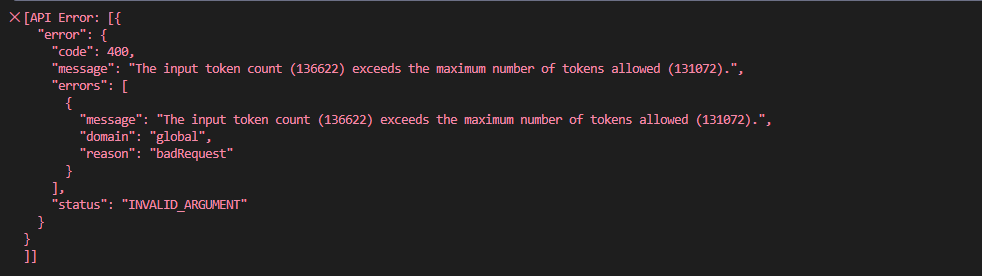
As you can see in the screenshot above, I hit the “input token count exceeds the maximum number of tokens allowed” error at 136,622 tokens. This was frustrating because I was in the middle of a task, and the tool couldn’t gracefully handle the context window boundary.
Claude Code, by comparison, handles context much better. It can manage longer multi-turn discussions without losing track, which I attribute to its larger context window (200k+ tokens) and better context management strategies.
What I Observed About Code Generation
One issue I encountered with Gemini CLI was its tendency to use outdated package versions. When I asked it to build a web project with the latest Astro framework, it repeatedly tried to use a pre-5.0 version. This meant I had to manually correct the versions, which slowed me down.
Claude Code, on the other hand, generally produces more current results. It seems to have better awareness of recent framework updates like Astro 5 or Next.js 15.
Another pattern I noticed: Gemini CLI tends to overengineer solutions. For a simple request like adding a field to a Kubernetes manifest, it generated an entire script with multiple commands and error handling. While this shows reasoning ability, it created unnecessary complexity. Claude Code’s responses are typically more direct and aligned with practical workflows — it does what I ask without the extra steps.
My Thoughts on Security
One thing that made me cautious with Gemini CLI is its ability to execute shell commands directly (after asking for confirmation). While this is powerful, it introduces security considerations. I had to be very careful about what commands I approved, especially when working in production-like environments.
Claude Code takes a more conservative approach. It doesn’t execute commands directly on your system. Instead, it provides the commands for you to review and run yourself. This extra layer of separation gives me more confidence when using it in sensitive environments.
My Side-by-Side Comparison
After using both tools extensively, here’s how they compare in practice:
| Feature | Gemini CLI | Claude Code |
|---|---|---|
| Model Source | Google Gemini (Cloud-based) | Anthropic Claude (Cloud-based) |
| Local Execution | No | No |
| Command Execution | Yes (requires approval) | No (provides commands to run) |
| Context Window | ~130k tokens (hit limits often) | 200k+ tokens (rarely hit limits) |
| Session Management | Manual checkpointing | Automatic session history |
| Stack Awareness | Sometimes outdated | Generally current |
| Response Style | Verbose, overengineers | Concise and practical |
| User Experience | More manual setup | Streamlined workflow |
In my experience, Gemini CLI feels like an experimental playground — capable and interesting, but with rough edges. Claude Code feels like a mature coding companion that I can rely on for production work.
Observability: A Nice Touch
One feature I appreciated in Gemini CLI is the /stats model command, which shows detailed token usage:
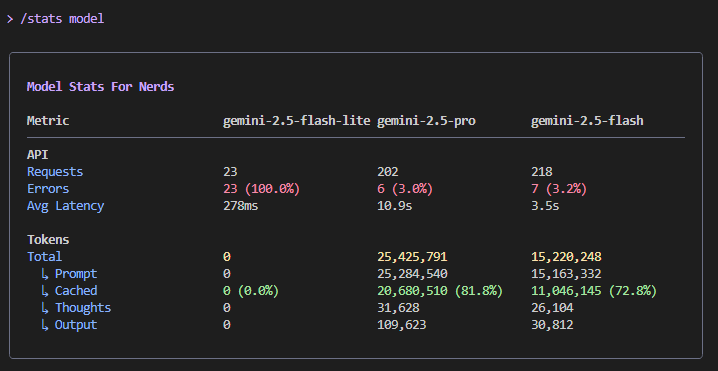
This transparency is helpful for understanding costs and usage patterns. During my testing session, I primarily used gemini-2.5-pro and gemini-2.5-flash models, and I could see exactly how tokens were distributed across API calls and cached tokens.
What Gemini CLI Does Well
Despite the challenges I encountered, Gemini CLI has some real strengths:
- It’s open-source and free for most developers (up to 1,000 requests per day on the free tier).
- Direct file system access means it can read and edit files in your project without manual copy-pasting.
- Good for documentation tasks like generating README files, project diagrams, or code summaries.
- Terminal-native workflow appeals to developers who live in the command line.
For creative exploration, research, or personal project automation, it’s genuinely a fun tool to experiment with.
Where Gemini CLI Struggles
However, for production-level engineering work, I found Gemini CLI isn’t quite ready yet. My main concerns:
- Token exhaustion happens frequently during complex multi-step tasks.
- Manual session management requires remembering to checkpoint and restore conversations.
- Inconsistent code generation, especially with newer framework versions.
- Overly verbose solutions that add unnecessary complexity.
- Context window limits that interrupt workflows at inconvenient times.
Claude Code avoids most of these pain points with better session continuity, a larger context window, and more practical response patterns.
Session Insights and Performance Metrics
At the end of each session, Gemini CLI provides a detailed summary:
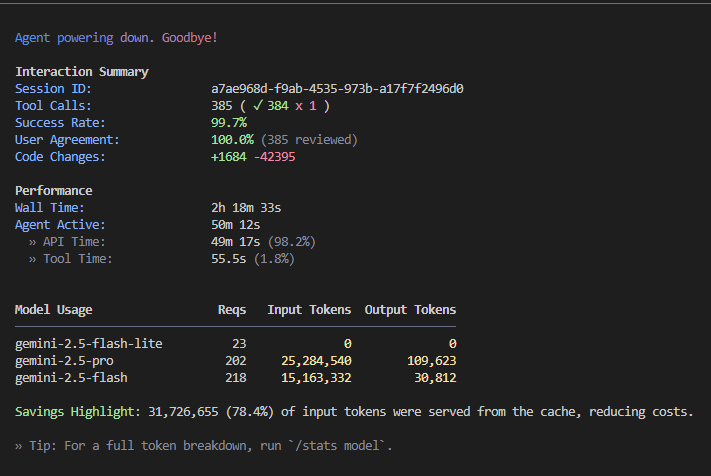
This particular session ran for over 2 hours with 385 tool calls and achieved a 99.7% success rate. I found these metrics helpful for understanding where time is spent. The interface shows:
- Wall time vs agent active time — helps identify when the agent is thinking vs when I’m waiting for other reasons.
- Tool call breakdown — shows how many operations succeeded or failed.
- Cache efficiency — in this session, 78.4% of input tokens were served from cache, which significantly reduces costs.
This level of observability is something I wish more AI tools provided.
My Final Take
After several days of testing both tools, here’s my honest assessment:
If you’re looking for an AI assistant to help with documentation, research, or initial prototyping, Gemini CLI is worth trying. It offers an interesting glimpse into what agentic AI can do when it has direct access to your local environment. For personal projects and experimentation, it’s genuinely fun to use.
But if you’re working on production code, debugging complex systems, or managing infrastructure, I still reach for Claude Code. It’s more reliable, handles context better, and produces cleaner, more practical solutions. The user experience is also significantly smoother, which matters when I’m trying to get work done efficiently.
In short:
- Gemini CLI is a promising experiment that’s fun for exploration and learning.
- Claude Code is a dependable tool I trust for professional work.
Both represent exciting directions for AI-assisted development. Gemini CLI shows Google’s ambition in this space, but it needs more polish before I’d use it for critical work. I’ll keep watching its progress, because the potential is definitely there.